- -$40.00

This module enhances the shopping experience by allowing customers to easily explore product variations such as...

The module allows merchants to enhance product images with customizable stickers and labels. Whether it’s...

The Quantity Discount Table module for PrestaShop makes bulk pricing clear and attractive by...

This module allows you to offer free shipping based on flexible conditions, such as location, carrier, cart value,...

The module automatically adjusts language, currency, and country settings based on the customer's location....

Vendor
Version
Last update
Prestashop version
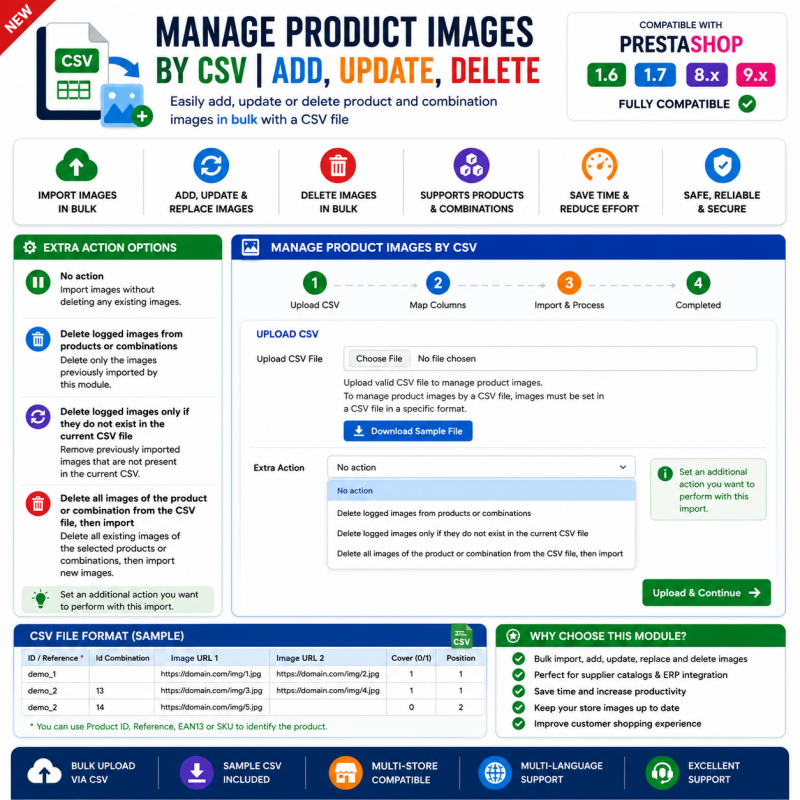
Manage Product Images by CSV – Add, Update & Delete is a PrestaShop module designed to simplify product image management through CSV files.
Managing images individually can become time-consuming when your store contains a large number of products. This module focuses on three important image operations: adding new product images, updating existing images, and deleting unwanted images.
By using a structured CSV-based workflow, store owners and catalogue managers can organize image-related changes more efficiently and maintain their product catalogues with less repetitive manual work.
Whether you are maintaining a growing product catalogue or updating existing product visuals, this module provides a dedicated approach to product image administration.
Simplify product image management in your PrestaShop store. Add, update, and delete product images using CSV-based operations instead of managing every image individually from the product editor.
Product images play an important role in every online store. They help customers understand the appearance, design, and details of the products they want to purchase.
However, maintaining images for a large catalogue can become time-consuming. Adding new images, replacing outdated visuals, or removing unwanted images product by product can require considerable administrative effort.
Manage Product Images by CSV is designed to simplify these tasks by providing a CSV-based workflow for adding, updating, and deleting product images in your PrestaShop catalogue.
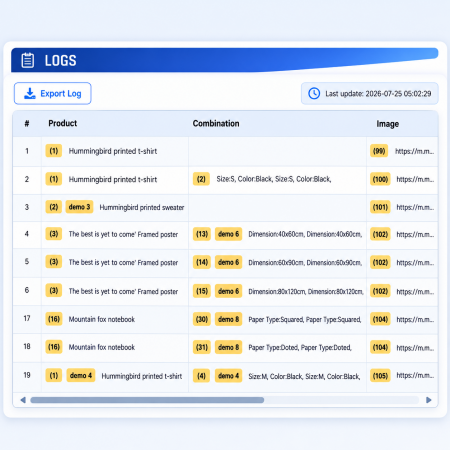
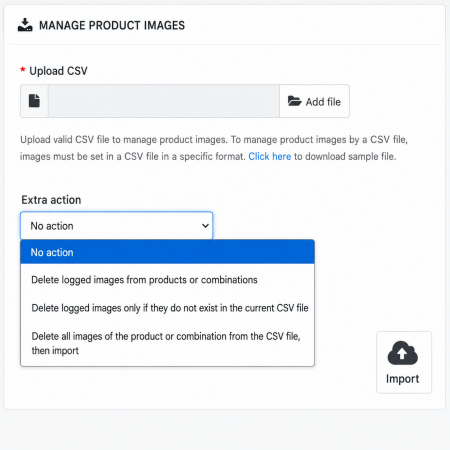
Illustrative concept only. Actual CSV columns, operation values, and processing interface depend on the module.
Manage Product Images by CSV is a PrestaShop module designed to simplify product image administration through CSV files. It focuses on three essential operations: adding new images, updating existing product images, and deleting images that are no longer required. It is intended to help store owners and catalogue managers handle image-related changes in a more structured way, especially when working with a large product catalogue.
Handle essential product image operations through a CSV-based workflow.
Use a structured CSV workflow for managing product image operations.
Add product images using the module's CSV-based image management process.
Manage changes to existing product images through the supported CSV operations.
Remove unwanted product images using the module's deletion workflow.
Organize image-related catalogue maintenance using prepared data files.
Work with prepared CSV data instead of relying entirely on individual manual image changes.
Manage the image lifecycle of your product catalogue through three core operations.
Prepare image data for the products that need additional visuals and process the additions using CSV.
Manage changes to existing product images using the module's supported update operation.
Manage the removal of unwanted product images through the supported CSV deletion process.
Identify the products and images that need to be added, updated, or deleted.
Create the CSV file using the column structure and operation format supported by the module.
Use the module's interface to process the prepared image-management data.
Review the affected product pages and confirm that the intended image changes are correct.
Stores that maintain images across many products and need a structured management workflow.
Retailers managing product visuals for clothing, footwear, accessories, and collections.
Stores that regularly revise product photos and maintain detailed product galleries.
Teams responsible for maintaining product images and keeping catalogue visuals organized.
A correctly structured CSV file is important for reliable image operations. Before processing, review the format expected by the module.
Use the product identifier or matching field required by the module to identify the correct product.
Prepare image paths, URLs, or other image references in the format accepted by the module.
Follow the module's specified values and rules for adding, updating, or deleting images.
Install Manage Product Images by CSV through your PrestaShop Back Office using the module ZIP package.
Download the module ZIP package and save it on your computer.
Log in to your PrestaShop Back Office and navigate to Modules → Module Manager.
Click Upload a module and select the downloaded package.
Allow PrestaShop to upload and install the module.
Open the module configuration page and review its available import and image-management options.
Use the module's expected CSV format and test a small set of product images before processing a larger catalogue.
It is a PrestaShop module designed to manage product images through CSV-based operations, including adding, updating, and deleting images.
Yes. Adding product images is one of the main operations identified for this module. Use the CSV structure and image references supported by its documentation.
The module is intended to support updating product images through its CSV workflow. Follow its matching and update rules to target the correct images.
Yes. Deleting product images is part of the module's stated purpose. Check the required identifiers and deletion format before processing.
PrestaShop's standard product import supports image-related fields, including image URLs. This module is focused specifically on product image management operations.
No. The CSV file must follow the column structure, separators, and operation values expected by the module. Refer to its supplied sample file or documentation.
Yes. Back up your database and product image files before running deletion or bulk update operations. Test with a small set of products first.
Simplify catalogue image maintenance with CSV-based add, update, and delete operations for PrestaShop.
| Vendor | Nxtal |
|---|---|
| Last update | Nov 03, 2026 |
| Version | 2.0.0 |
| Required store version | From 1.6.x to 9.2.x |
| Publication date | Jul 25, 2026 |
| Return Policy | You can return the product within the 30 Days return period for a full refund. No questions asked. |
| Customer Support | Enjoy one year of free customer support, including installation, troubleshooting, and usage guidance. |
| Description | This product is compatible with the specified versions and includes all the latest updates to enhance functionality and user experience. |

 WhatsApp Live Chat Module for PrestaShop

 Buy Now Button | Quick Order Prestashop Module

 Advanced URL Redirection (301, 302, 404) Prestashop Module

 Recently Viewed and Ordered Products Module for PrestaShop

 Display Price Tax Inclusive or Exclusive Prestashop Module

 Save & Share My Shopping Cart Prestashop Module
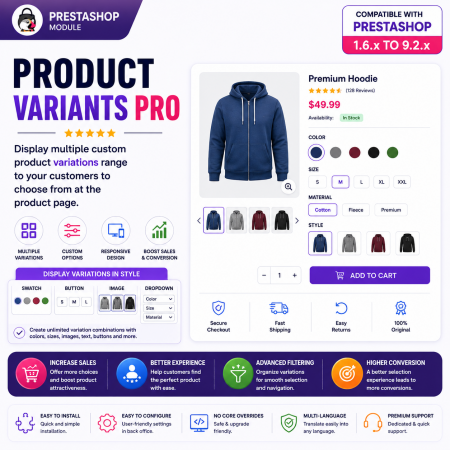
 PrestaShop Product Variants Pro – Custom Product Variant Groups Module

 Hide Product Price Prestashop Module

 Display Add to Cart Button on Product Listing Prestashop Module

 PrestaShop Smart Similar Products – Attribute, Price & Feature Matching
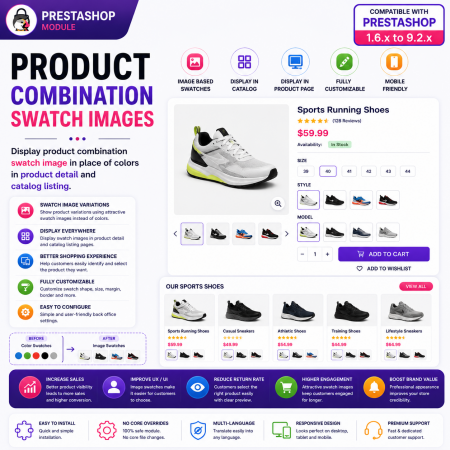
 PrestaShop Product Combination Swatch Images – Visual Product Variations Module

 PrestaShop Product Video Module – YouTube, Vimeo & Video Upload

 PrestaShop Notify Me Pro | Price Drop, New Arrivals & Stock Alerts Module

 Advanced Product Navigation – Previous & Next for PrestaShop

 Display Product Slider & Grid Prestashop Module

 Advanced Add to Cart Button Module for PrestaShop
Manage Product Images by CSV – Add, Update & Delete is a PrestaShop module designed to simplify product image management through CSV files.
Managing images individually can become time-consuming when your store contains a large number of products. This module focuses on three important image operations: adding new product images, updating existing images, and deleting unwanted images.
By using a structured CSV-based workflow, store owners and catalogue managers can organize image-related changes more efficiently and maintain their product catalogues with less repetitive manual work.
Whether you are maintaining a growing product catalogue or updating existing product visuals, this module provides a dedicated approach to product image administration.

Encrypted payment gateways ensuring your financial and personal data remain 100% protected.

Every module includes professional installation assistance, free updates, and reliable troubleshooting.

Rigorously tested PrestaShop & WooCommerce extensions designed for maximum speed and zero bloat.

Transparent policies, clean documentation, and dedicated assistance if you run into any compatibility hurdles.