Running an online store is not only about adding products and attracting customers. One of the biggest challenges for store owners is managing discounts and promotional offers at the right time.
A simple store may have only one promotion running at a time. But as your business grows, you may want to create different offers for different dates, products, categories, or promotional campaigns.
The Problem With Managing Discounts Manually
PrestaShop provides powerful pricing and specific-price features, but managing multiple promotional campaigns can become complicated when your store has many products and frequent offers.
For example, you may want to run:
- 10% discount during a weekend sale
- 20% discount during a festival
- 30% discount for a special promotional event
- Special discounts during Black Friday
- Limited-time offers for selected products
- Seasonal discounts that automatically start and expire
Managing all these promotions manually can become time-consuming and may result in missed promotions, incorrect discounts, or expired offers remaining active.
What Is a Date-Wise Discount?
A date-wise discount allows you to define when a discount should become active and when it should expire.
Instead of manually changing product prices every time a promotion starts or ends, you can configure a discount with a specific date range.
Example: Summer Sale
- Start: June 1
- End: June 15
- Discount: 20%
This approach is particularly useful for stores that regularly run seasonal and promotional campaigns.
Multiple Discounts for Different Promotions
The biggest advantage of a multiple discount system is that you are not restricted to a single promotional campaign.
You can create different discount rules for different periods.
| Promotion |
Discount |
Start Date |
End Date |
| Weekend Sale |
10% |
Friday |
Sunday |
| Summer Sale |
20% |
June 1 |
June 15 |
| Festival Offer |
25% |
October 1 |
October 10 |
| Black Friday |
40% |
November 27 |
November 30 |
PrestaShop Multiple Discount Date-Wise Discount Module
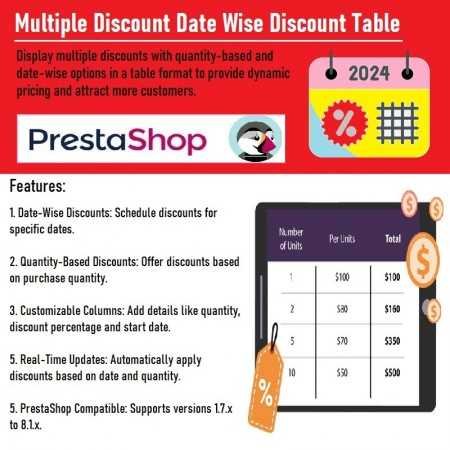
The Multiple Discount Date-Wise Discount PrestaShop Module is designed to simplify the management of time-based promotional offers.
Instead of repeatedly changing product discount settings manually, store administrators can create discount campaigns based on dates.
The module can be useful for managing:
- Seasonal sales
- Festival offers
- Weekend promotions
- Flash sales
- Holiday discounts
- Limited-time offers
- Product-specific promotions
- Category-based promotions
- Special campaign periods
Run Seasonal Sales More Easily
Seasonal promotions are an important part of eCommerce. For example, you can prepare different campaigns for different periods.
Summer Sale
20% OFF
June 1 – June 15
Winter Sale
30% OFF
December 1 – December 31
New Year Sale
25% OFF
December 25 – January 5
Instead of remembering to manually update every product when a campaign starts or ends, date-based discount rules can help organize your promotional schedule.
Create Limited-Time Offers
Limited-time offers can encourage customers to purchase within a specific period.
Flash Sale
30% OFF
Valid from 12 PM to 6 PM
Weekend Special
20% OFF
Friday – Sunday
Date-based discount management makes it easier to organize these campaigns according to your promotional calendar.
Reduce Manual Discount Management
One of the main goals of a discount management module is to reduce repetitive administrative work.
Without a dedicated solution, an administrator may need to:
- Open product settings.
- Change the discount.
- Set the promotion dates.
- Save the product.
- Repeat the process for other products.
- Remove or change the discount after the promotion.
When you have hundreds or thousands of products, this process can become difficult to maintain.
A centralized date-wise discount system can make campaign management more organized.
Perfect for Promotional Campaigns
The module can be useful for different types of eCommerce campaigns.
Seasonal Promotions
Run summer, winter, spring, or other seasonal sales.
Festival Discounts
Create special offers around festivals and holidays.
Flash Sales
Set a discount for a limited period.
Weekend Deals
Create promotional periods for weekend campaigns.
Product Promotions
Offer special discounts on selected products.
Event-Based Sales
Plan discounts around business events and special occasions.
Improve Your Promotional Planning
Successful promotions usually require planning. Instead of deciding discounts at the last minute, store owners can create a promotional calendar.
- January: New Year Sale – 20%
- February: Valentine's Promotion – 15%
- March: Spring Sale – 25%
- June: Summer Sale – 30%
- November: Black Friday – 40%
- December: Christmas Sale – 35%
With date-based discount management, these campaigns can be organized according to their respective promotional periods.
Why Date-Based Discounts Matter for eCommerce
Customers often look for deals during specific periods. A well-planned promotional strategy can help an online store:
- Keep promotions organized
- Launch offers on schedule
- Create time-limited campaigns
- Manage seasonal pricing
- Reduce repetitive administration
- Keep promotional campaigns structured
The important part is not simply offering discounts, but managing those discounts effectively.
Who Can Use This PrestaShop Module?
The module can be useful for different types of PrestaShop stores, including:
- Fashion stores
- Electronics stores
- Beauty and cosmetics stores
- Grocery stores
- Furniture stores
- Accessories stores
- Digital product stores
- Multi-category stores
- Seasonal businesses
Whether your store has 50 products or thousands of products, structured discount management can make promotional campaigns easier to maintain.
Example: Black Friday Campaign
Suppose you want to run a Black Friday promotion.
Campaign: Black Friday Sale
Discount: 40%
Start Date: November 27
End Date: November 30
You can prepare the campaign before Black Friday and define the promotional period.
Once the campaign period is over, the discount can stop according to the configured date range.
This reduces the need to manually remember when the campaign should end.
Turn Your PrestaShop Store Into a Promotion-Ready Store
Customers love promotions, but managing promotions should not become a full-time task for the store administrator.
With a Multiple Discount Date-Wise Discount PrestaShop Module, you can organize your promotional campaigns around dates and create a more structured discount management workflow.
From weekend offers to festival campaigns and Black Friday sales, date-based discounts give you more control over when your promotions run.
Key Benefits
Multiple Promotional Campaigns
Create different discount campaigns for different promotional periods.
Date-Based Discount Management
Define when a discount should start and end.
Less Manual Work
Reduce repetitive discount configuration and administration.
Seasonal Sales
Plan discounts for seasonal campaigns.
Festival Promotions
Prepare promotional offers for important dates and events.
Limited-Time Deals
Create promotions that are available only during a specific period.
Better Campaign Organization
Keep your promotional strategy structured and easier to manage.
Final Thoughts
Discounts are one of the most powerful tools available to an eCommerce store, but managing multiple promotions manually can quickly become difficult.
A Multiple Discount Date-Wise Discount PrestaShop Module helps store administrators organize promotional campaigns around specific dates and promotional periods.
Whether you are planning a weekend sale, seasonal promotion, festival discount, flash sale, or Black Friday campaign, date-wise discount management can help simplify the process.
Instead of constantly changing discounts manually, prepare your campaigns in advance and let your PrestaShop store follow the configured promotional schedule.
Ready to Simplify Discount Management?
Explore the Multiple Discount Date-Wise Discount PrestaShop Module and start planning your promotional campaigns more efficiently.
View Module















Leave a comment
Log in to post comments