- -$20.00

This module enhances the shopping experience by allowing customers to easily explore product variations such as...

The module allows merchants to enhance product images with customizable stickers and labels. Whether it’s...

The Quantity Discount Table & Grid Module for PrestaShop helps merchants display...

This module allows you to offer free shipping based on flexible conditions, such as location, carrier, cart value,...

The module automatically adjusts language, currency, and country settings based on the customer's location....



Vendor
Version
Last update
Woocommerce version
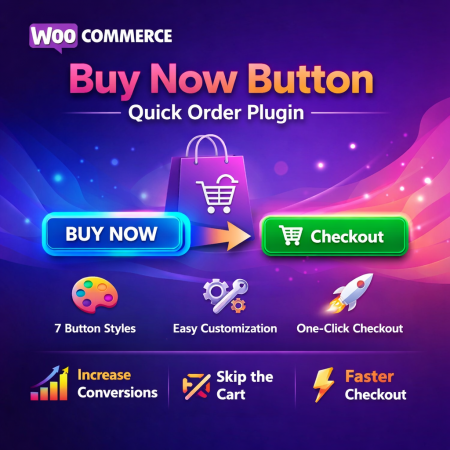
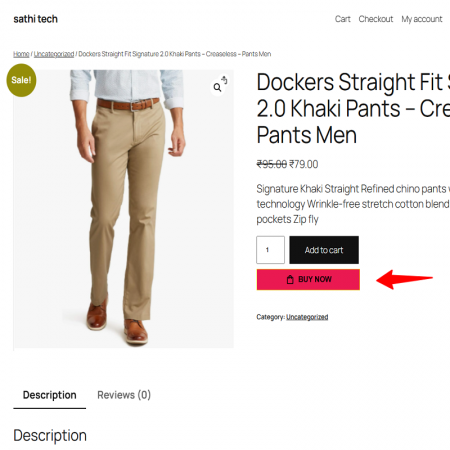
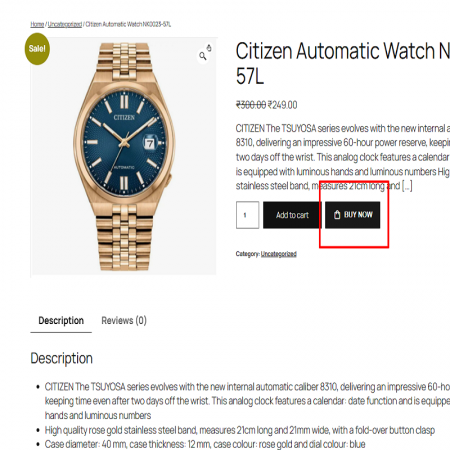
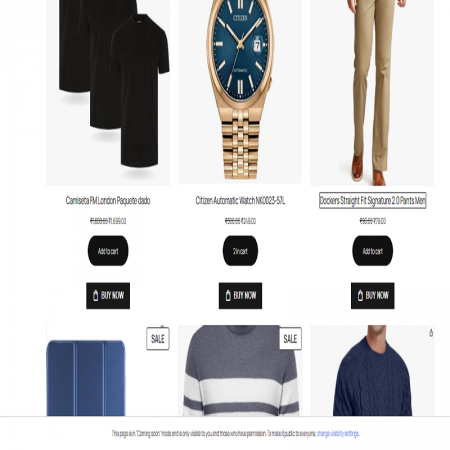
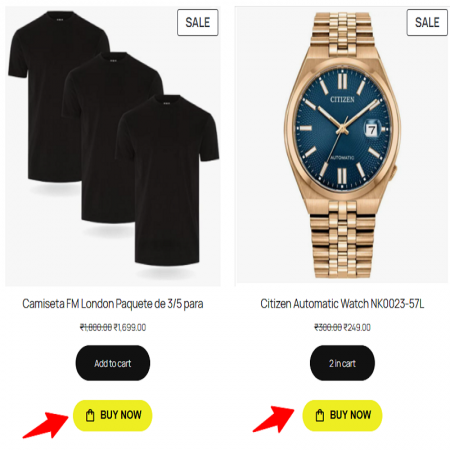
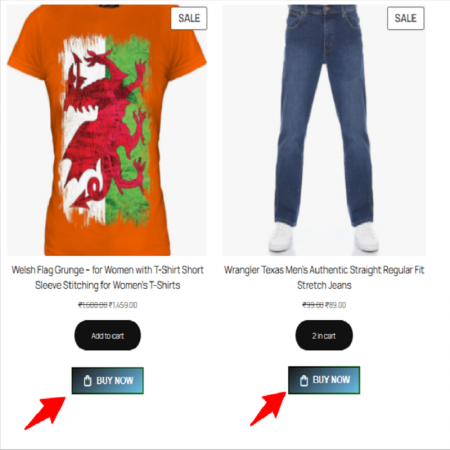
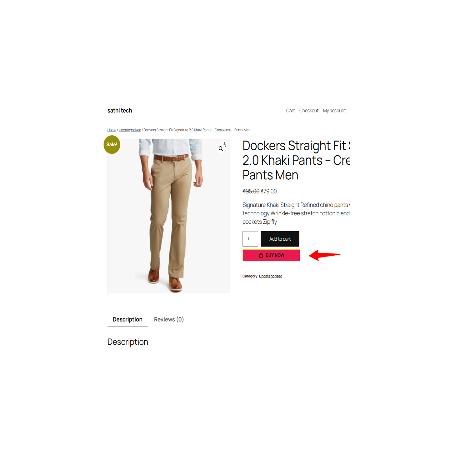
Buy Now Button – Quick Order is a WooCommerce plugin designed to provide customers with a more direct and convenient way to purchase products.
Instead of depending only on the traditional Add to Cart process, customers can use a dedicated Buy Now option to proceed with their purchase.
The plugin is intended to simplify the buying journey, reduce unnecessary navigation, and make product purchasing more convenient for customers who are ready to order.
Key benefits:
Provide a dedicated Buy Now purchase option.
Make product ordering more convenient.
Reduce unnecessary steps in the shopping journey.
Give customers an alternative to the standard Add to Cart action.
Support a smoother product-to-purchase experience.
Improve the convenience of your WooCommerce storefront.
Ideal for fashion stores, electronics shops, beauty stores, and other WooCommerce businesses looking to simplify their purchasing experience.
Make shopping simpler with a quick purchase option. Help customers move from product discovery toward checkout with fewer unnecessary steps and a more direct buying experience.
A smooth purchasing experience is important for every online store. Customers may find a product they want to purchase, but having to follow several steps before reaching checkout can make the buying process feel longer than necessary.
The Buy Now Button – Quick Order Plugin for WooCommerce is designed to provide customers with a more direct way to purchase products. A dedicated Buy Now option helps customers move toward the next stage of the purchase process without relying only on the traditional Add to Cart workflow.
Make your WooCommerce store easier to shop, reduce unnecessary navigation, and provide a more convenient purchase experience for customers who are ready to buy.
Customers choose the product they want to purchase.
A direct purchase option helps customers proceed with their order.
Customers continue through the configured purchase flow.
Customers may need to move through additional cart and navigation steps before reaching checkout.
Customers who already know what they want may prefer a more direct route to the purchase process.
A lengthy purchasing journey can make the shopping experience feel less straightforward.
Customers who have already made a purchase decision may not need to spend additional time navigating the store.
The plugin introduces a quick purchase option that makes it easier for customers to move from product selection to the next stage of ordering.
Give customers a dedicated Buy Now option instead of relying only on the standard Add to Cart action.
Make the purchase journey more direct for customers who are ready to place an order.
Offer an alternative buying action that can make shopping easier and more straightforward.
Help customers move forward with their purchase through a focused ordering experience.
Provide customers with a dedicated quick purchase option in your WooCommerce store.
Make it easier for customers to proceed with their purchase without relying only on the traditional shopping flow.
Give ready-to-buy customers a clear purchase action from the product-shopping experience.
Help customers move toward ordering with fewer unnecessary browsing steps.
Offer a dedicated purchase action alongside the normal shopping experience, subject to plugin settings.
Create a more convenient way for customers to proceed when they are ready to purchase.
The customer finds the product they want to purchase.
The customer selects the quick purchase option.
The customer proceeds through the configured purchase flow.
The customer reviews the order and completes checkout.
Give shoppers a direct purchase option when they find clothing and accessories they want.
Make product purchasing more convenient for customers who already know what they need.
Offer a straightforward buying action for shoppers browsing beauty and personal-care products.
Provide a convenient purchase option across a wide range of store products.
Offer a more direct way for customers to move toward checkout.
Make the buying process more straightforward for ready-to-buy shoppers.
Give customers a clear alternative to the standard cart action.
Follow these steps to install and activate the plugin on your WordPress website.
Download the Buy Now Button – Quick Order plugin ZIP file from your Sathi account.
Log in to your WordPress admin panel using an administrator account.
Go to Plugins → Add New Plugin from the WordPress dashboard.
Click Upload Plugin, choose the downloaded ZIP file, and select Install Now.
After the installation finishes, click Activate Plugin.
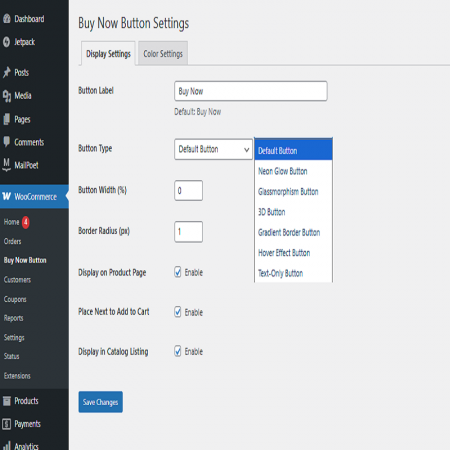
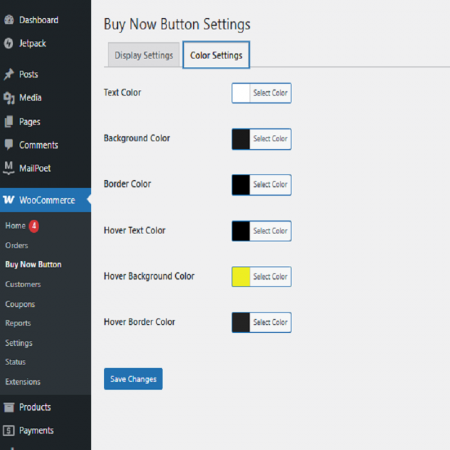
Locate the plugin's settings page in the WordPress dashboard and review the available configuration options.
Configure the supported Buy Now options, then visit your storefront and test the purchase flow with a sample product.
Back up your website before installation. Confirm that WooCommerce is installed and active, and test the plugin with your theme and checkout setup before using it on a live store.
The exact redirect destination, button placement, button styling, product targeting, quantity behavior, variable-product support, and cart handling depend on the plugin's implemented settings. Please refer to the plugin configuration and documentation for the options available in your installed version.
Improve the shopping journey with Buy Now Button – Quick Order for WooCommerce. Give customers a more direct and convenient way to proceed with their purchases.
| Vendor | Sathi |
|---|---|
| Last update | Nov 04, 2026 |
| Version | 1.0.0 |
| Required store version | From 5.6 to 11.1 |
| Publication date | Apr 10, 2026 |
| Return Policy | You can return the product within the 30 Days return period for a full refund. No questions asked. |
| Customer Support | Enjoy one year of free customer support, including installation, troubleshooting, and usage guidance. |
| Description | This product is compatible with the specified versions and includes all the latest updates to enhance functionality and user experience. |

 Free Super Assistant – AI Chatbot for Online Stores | Sells, Supports & Answers 24/7

 Advanced Product Stickers and Labels Plugin for WooCommerce

 Product Variation Table Woocommerce Plugin
Buy Now Button – Quick Order is a WooCommerce plugin designed to provide customers with a more direct and convenient way to purchase products.
Instead of depending only on the traditional Add to Cart process, customers can use a dedicated Buy Now option to proceed with their purchase.
The plugin is intended to simplify the buying journey, reduce unnecessary navigation, and make product purchasing more convenient for customers who are ready to order.
Key benefits:
Provide a dedicated Buy Now purchase option.
Make product ordering more convenient.
Reduce unnecessary steps in the shopping journey.
Give customers an alternative to the standard Add to Cart action.
Support a smoother product-to-purchase experience.
Improve the convenience of your WooCommerce storefront.
Ideal for fashion stores, electronics shops, beauty stores, and other WooCommerce businesses looking to simplify their purchasing experience.

Encrypted payment gateways ensuring your financial and personal data remain 100% protected.

Every module includes professional installation assistance, free updates, and reliable troubleshooting.

Rigorously tested PrestaShop & WooCommerce extensions designed for maximum speed and zero bloat.

Transparent policies, clean documentation, and dedicated assistance if you run into any compatibility hurdles.