Super Assistant Lite – Free AI Chatbot for WooCommerce & WordPress
Sell Smarter. Support Customers 24/7. Automate Shopping Conversations with AI.
Imagine a customer visiting your online store at midnight, looking for a specific product, checking its price, asking about delivery, or trying to find an existing order. Without immediate assistance, that customer may leave your website before completing a purchase.
Traditional customer support depends on human availability, while basic chatbots often provide only predefined answers. Modern eCommerce businesses need a smarter solution that can understand customer questions, search products, assist with shopping, and provide relevant support.
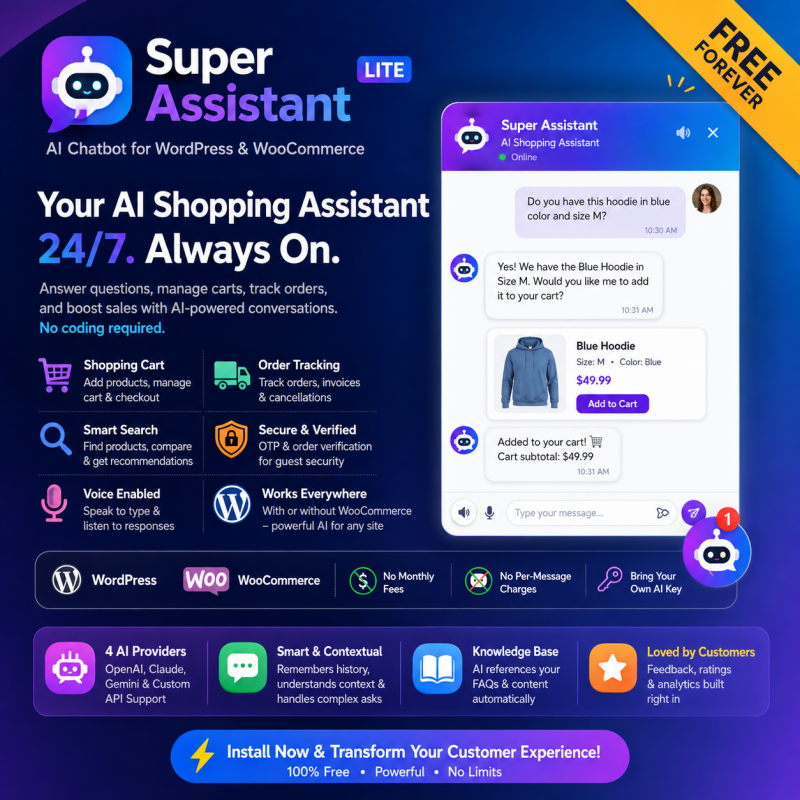
Introducing Super Assistant Lite, a free AI-powered chatbot plugin for WordPress and WooCommerce that transforms your website into an intelligent shopping and customer support assistant.
Connect your own OpenAI, Anthropic Claude, Google Gemini, or custom AI-compatible API and allow customers to interact naturally with your website.
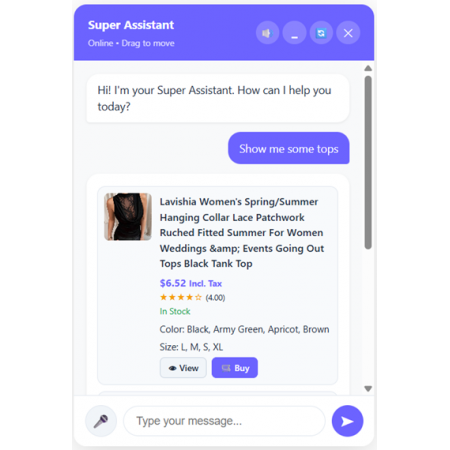
Unlike ordinary FAQ chatbots, Super Assistant Lite integrates with WooCommerce to help customers discover products, explore variations, manage shopping carts, apply discount coupons, check orders, access invoices, and receive personalized product recommendations directly through the chat interface.
It also works without WooCommerce, providing an AI-powered knowledge base and conversational assistant for business websites, blogs, educational platforms, and service-based websites.
1. Why Choose Super Assistant Lite?
Many chatbot solutions charge recurring subscription fees, limit important features to premium plans, or add additional charges based on conversations.
Super Assistant Lite takes a different approach.
It provides a feature-rich AI assistant without a monthly plugin subscription. You connect your own AI provider API key and pay the provider directly according to its pricing and usage.
What Makes Super Assistant Lite Different?
-
100% Free Plugin: Use the published plugin features without a paid chatbot subscription.
-
Bring Your Own AI API: Connect OpenAI, Claude, Gemini, or a custom compatible AI endpoint.
-
25 WooCommerce AI Tools: Give customers access to shopping, product discovery, cart, order, and store-information capabilities.
-
Intelligent Product Discovery: Search products using natural-language questions and multiple product filters.
-
Smart Cart Management: Add products, select variations, change quantities, remove items, and apply coupons through chat.
-
Secure Order Assistance: Help customers access their order information through server-side verification.
-
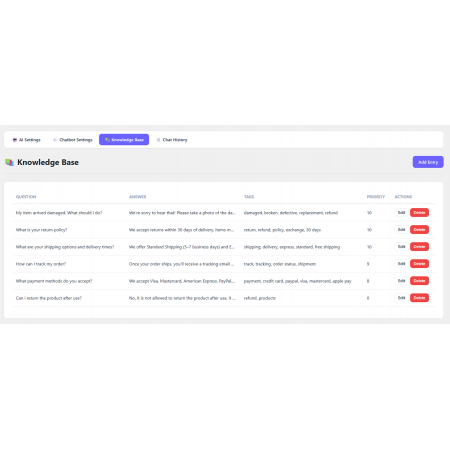
AI Knowledge Base: Train the assistant with your own FAQs, shipping policies, return rules, and business information.
-
Voice Interaction: Support voice input and text-to-speech responses.
-
Customizable Chat Widget: Match the chatbot appearance with your website branding.
-
Privacy-Focused Architecture: Customer data and plugin records stay on your WordPress server, with external AI requests sent to your selected provider.
2. AI-Powered WooCommerce Shopping Assistant
The biggest advantage of Super Assistant Lite is its ability to interact with your WooCommerce store rather than simply answering general questions.
Customers can describe what they want in everyday language, and the AI assistant can use the available WooCommerce tools to perform relevant shopping operations.
2.1. Intelligent Product Search and Discovery
Help customers discover the right products without manually navigating through multiple categories and filters.
The AI assistant can search your WooCommerce product catalog using different search criteria.
Product search capabilities:
-
Search products by product name or keyword.
-
Find products using SKU or product ID.
-
Filter products by category.
-
Search products within a specified price range.
-
Find products using attributes such as size, color, and other available options.
-
Filter products by supported brand taxonomies.
-
Check product stock status, including in-stock, out-of-stock, and backorder products.
-
Filter products by customer ratings.
-
Sort products by price, popularity, rating, or newest arrivals.
-
Retrieve detailed product information, including variations, attributes, pricing, weight, and dimensions.
-
Browse available product categories and their product counts.
-
Recommend upsells, cross-sells, related products, and popular items.
Example customer conversations:
"Show me laptops under $500."
"Find red dresses in size Large."
"Show me products rated 4 stars or above."
"Find wireless headphones from my favorite brand."
"Show me the latest products in the electronics category."
Business benefit: Make product discovery more convenient, reduce navigation effort, and help shoppers find relevant products through natural conversations.
2.2. Smart WooCommerce Cart Management
A customer should not need to leave the chatbot to perform basic shopping cart operations.
Super Assistant Lite allows customers to interact with their WooCommerce cart directly through chat.
Cart management features:
-
Add products to the shopping cart using their names, IDs, or SKUs.
-
Automatically match product variations based on attributes such as size and color.
-
Add variable products with the correct selected variations.
-
Update product quantities.
-
Remove products from the shopping cart.
-
View cart contents and product details.
-
Display cart subtotals and totals.
-
View applied discount coupons.
-
Apply coupon codes directly through chat.
-
Generate shareable pre-filled cart links using unique server-generated keys.
Example customer conversations:
"Add a blue medium t-shirt to my cart."
"Change my shoe quantity to 2."
"Remove the headphones from my cart."
"Apply coupon SAVE20."
"Show me my current cart total."
Business benefit: Reduce friction in the shopping journey and allow customers to complete common cart operations without navigating away from the conversation.
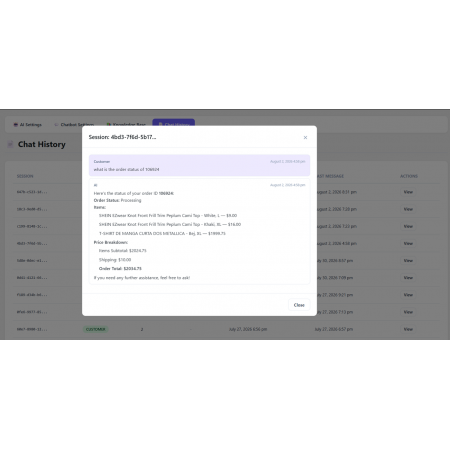
2.3. Automated Order Tracking and Customer Support
Order-related questions are among the most common customer support requests in eCommerce.
Customers frequently want to know whether an order has been confirmed, whether payment was received, when a package will arrive, or how to access an invoice.
Super Assistant Lite provides WooCommerce order-support tools through the AI chatbot.
Order support capabilities:
-
Retrieve order information using an order ID.
-
Search customer orders using an email address.
-
Filter order searches by product name, shipping address, status, and date range.
-
View order items and order totals.
-
Check payment status and payment method.
-
Retrieve shipping method information.
-
Access shipment tracking information when compatible with WooCommerce Shipment Tracking.
-
View billing and invoice details.
-
Access refund history.
-
Email WooCommerce invoices directly to customers.
-
Cancel eligible pending or on-hold orders with a cancellation reason.
Example customer conversations:
"Where is my order #1234?"
"Show my recent orders."
"Has my payment been received?"
"Send me the invoice for my last purchase."
"Can I cancel my pending order?"
Business benefit: Automate common order inquiries and reduce the amount of repetitive work handled by your customer support team.
2.4. WooCommerce Store Information Assistant
Customers often ask basic questions about store operations before placing an order.
The AI assistant can retrieve supported store information and provide relevant links.
Store information capabilities:
-
Retrieve store name and address.
-
Access store contact information.
-
Retrieve available payment methods.
-
Retrieve shipping method information.
-
Provide direct URLs to shop, cart, checkout, My Account, product, and category pages.
-
Retrieve links to privacy policy, refund policy, and terms of service.
-
Compare two to five products side by side.
Product comparison includes:
Business benefit: Help customers find important store information and make more informed purchasing decisions.
3. Connect Your Preferred AI Provider
Every business has different AI requirements, budgets, and infrastructure preferences.
Super Assistant Lite supports four AI connection options, allowing store owners to choose the provider that best suits their needs.
3.1. OpenAI Integration
Connect your OpenAI API key and use supported GPT models.
Suitable for:
3.2. Anthropic Claude Integration
Connect Anthropic Claude models for conversational AI and detailed customer interactions.
Suitable for:
-
Detailed product explanations.
-
Complex customer questions.
-
Longer conversations.
-
Contextual customer assistance.
3.3. Google Gemini Integration
Use Google Gemini models for AI-powered customer interactions.
Suitable for:
-
Fast customer responses.
-
High-volume conversational workloads.
-
Multilingual customer interactions.
-
Cost-conscious AI deployments.
3.4. Custom AI API Integration
Connect any compatible OpenAI-style API endpoint.
Supported examples include:
This option also allows businesses to connect supported local inference servers.
Advanced AI configuration options:
-
API key management.
-
AI provider selection.
-
Model selection.
-
Temperature configuration.
-
Maximum token configuration.
-
Custom system prompt.
-
Custom API endpoint.
-
Configurable authentication header key and format.
Important: You can switch AI providers without needing to rebuild your website's customer-facing chatbot. Actual model availability depends on the connected provider and its API.
4. Three-Tier Customer Verification and Security
Order information is sensitive customer data. A chatbot must not expose private order information simply because someone asks for it.
Super Assistant Lite includes a three-tier customer verification system to protect access to order-related information.
4.1. Logged-In Customer Verification
Customers who are already signed in can access their own eligible order information through their authenticated account session.
This provides a convenient experience without requiring additional verification for every request.
4.2. Guest Order Verification
Guest customers can verify their order ownership using supported order information, including billing email or exact order date.
The verification is matched against the order record on the server.
4.3. OTP Email Verification
An additional verification method uses a six-digit code sent to the customer's email address.
OTP security features:
-
Six-digit verification code.
-
Ten-minute code validity.
-
Server-side verification.
-
One-hour trusted verification session.
Additional Security Measures
-
Server-side enforcement of order access permissions.
-
WordPress nonce verification on REST API requests.
-
Configurable message rate limiting.
-
Input sanitization.
-
Secure OTP handling using expiring WordPress transients.
-
WooCommerce HPOS compatibility.
Business benefit: Provide conversational order assistance while keeping customer order information protected by verification checks.
5. Customizable AI Chatbot Widget
Your chatbot is one of the interactive elements customers see throughout your website.
Super Assistant Lite includes a customizable floating chat widget designed for desktop and mobile visitors.
5.1. Chatbot Appearance Customization
Personalize the assistant to match your website's branding.
Customization options:
-
Custom chatbot name.
-
Custom avatar image URL.
-
Primary chatbot color.
-
Bottom-left or bottom-right positioning.
-
Custom welcome message.
-
Custom input placeholder.
-
Draggable and resizable chat window.
-
Responsive mobile layout.
-
Floating welcome teaser message.
5.2. AI Response Behavior
Control how the assistant presents its responses.
Response features:
-
Typewriter-style response animation.
-
Instant response display mode.
-
Configurable typewriter speed.
-
Markdown formatting.
-
Support for bold and italic text.
-
Lists, tables, links, and code formatting.
-
Configurable conversation session timeout.
-
Persistent conversation history across page navigation.
-
Smart conversation history compaction to help manage AI token usage.
5.3. Voice Input and Text-to-Speech
Make customer conversations more convenient by allowing visitors to speak instead of typing.
Voice capabilities:
-
Voice input using supported browser speech recognition.
-
Text-to-speech responses.
-
Browser-available voice selection.
-
Configurable speech speed.
-
Configurable voice pitch.
-
Audio enable/disable control.
-
Voice preview in the administration settings.
Voice input support depends on browser capabilities, with Chrome and Edge supported as documented.
5.4. Customer Feedback System
Understand how customers feel about their chatbot experience.
Feedback capabilities:
-
One-to-five-star conversation ratings.
-
Optional written customer comments.
-
Thumbs-up and thumbs-down message feedback.
-
Feedback storage in the administration area.
-
Session-level ratings in chat history.
-
Feedback summary for positive and negative responses.
5.5. Automatic Offline Mode
An AI chatbot should not leave customers with a broken interface when the AI service is unavailable.
Super Assistant Lite includes a fallback offline experience.
If the AI API is unavailable or not configured, customers receive a friendly offline message with your support email instead of an unusable chatbot interface.
6. AI-Powered Knowledge Base – Train Your Chatbot with Your Business Information
A general AI model does not automatically know your store's exact return policy, delivery conditions, warranty information, or business-specific procedures.
The built-in knowledge base helps you provide your own business information so the assistant can answer customer questions using relevant store-specific content.
6.1. Create Custom Knowledge Base Entries
Create question-and-answer entries containing information about your business.
Each entry supports:
-
Customer question.
-
Official answer.
-
Search tags.
-
Priority settings.
-
Active/inactive status.
6.2. What Information Can You Add?
You can create knowledge base entries for:
-
Shipping policies and delivery times.
-
Return and refund conditions.
-
Warranty information.
-
Frequently asked questions.
-
Product care instructions.
-
Store contact information.
-
Loyalty program information.
-
Payment and store-specific policies.
6.3. How Does the Knowledge Base Work?
When a customer sends a message, the assistant searches your knowledge base for relevant entries before generating a response.
Knowledge base functionality:
-
Automatic knowledge base searching.
-
Word-by-word matching across questions, answers, and tags.
-
Up to five matching entries added to AI context.
-
Priority-based matching order.
-
Only active knowledge base entries are considered.
Business benefit: Give the AI assistant access to your actual business information and reduce reliance on generic answers.
The knowledge base provides relevant information to the AI; it does not guarantee that every generated response will be error-free. Review important business policies and test customer questions before going live.
7. Powerful Administration Dashboard
Managing an AI chatbot should be straightforward.
Super Assistant Lite provides a centralized administration dashboard where you can configure AI providers, chatbot appearance, knowledge base entries, and customer conversations.
7.1. AI Provider Settings
-
Select OpenAI, Claude, Gemini, or a custom provider.
-
Configure your API key.
-
Select the AI model.
-
Adjust temperature.
-
Configure maximum response tokens.
-
Define custom system instructions.
-
Configure custom API endpoints.
-
Manage authentication header settings.
-
Configure message rate limits.
-
Enable or disable the knowledge base.
-
Enable or disable customer feedback.
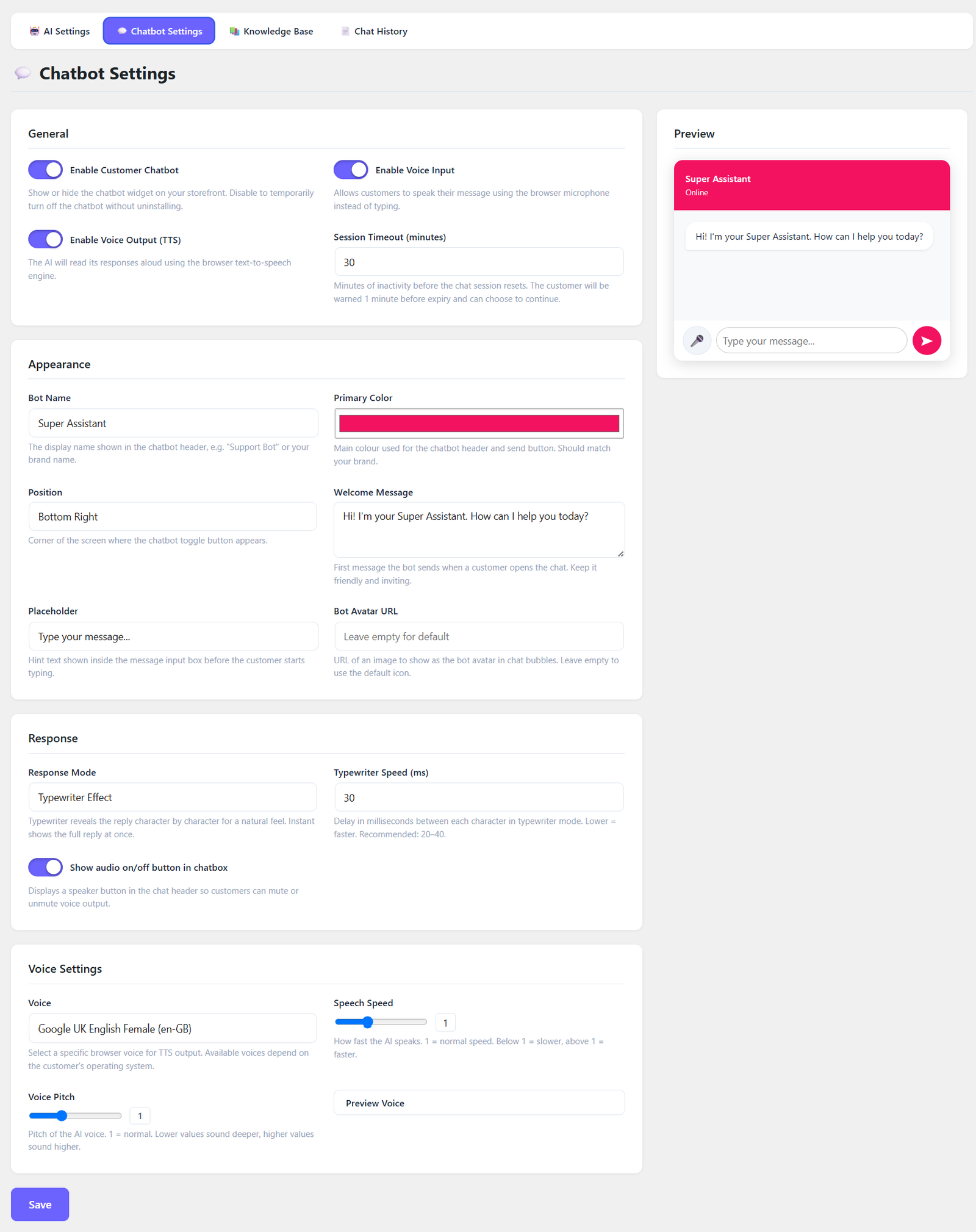
7.2. Chatbot Configuration
-
Enable or disable the chatbot.
-
Configure bot name and avatar.
-
Change primary colors.
-
Select chatbot position.
-
Customize welcome messages.
-
Configure input placeholder.
-
Select response display mode.
-
Adjust typewriter animation speed.
-
Configure session timeout.
-
Enable voice input.
-
Enable voice output.
-
Select speech voice.
-
Configure speech speed and pitch.
-
Control audio button visibility.
-
Preview chatbot changes in real time.
7.3. Knowledge Base Management
Manage your business information directly from the dashboard.
-
View knowledge base entries in a paginated table.
-
Add new questions and answers.
-
Edit existing entries.
-
Delete entries with confirmation.
-
Manage search tags.
-
Configure answer priority.
-
Activate or deactivate individual entries.
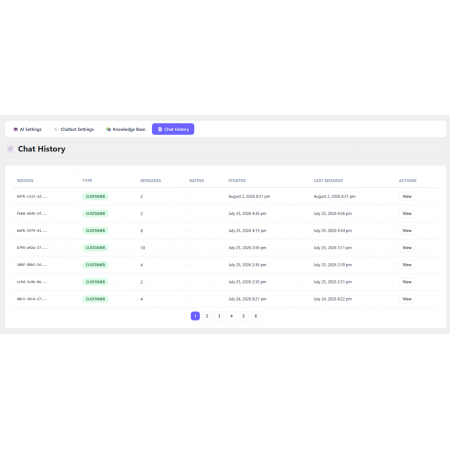
7.4. Chat History and Conversation Monitoring
Review customer interactions and understand how visitors use your AI assistant.
Chat history features:
-
Paginated conversation session list.
-
Message count for each session.
-
Customer and administrator session labels.
-
Conversation ratings.
-
Full conversation viewing.
-
Message-level feedback.
-
Written customer comments.
-
Positive and negative feedback summaries.
Business benefit: Understand customer questions, discover missing information, improve knowledge base answers, and continuously improve your support experience.
8. Works Without WooCommerce – AI Chatbot for Any WordPress Website
Super Assistant Lite is not limited to online stores.
You can use it on a regular WordPress website without activating WooCommerce.
When WooCommerce is unavailable, the plugin automatically disables commerce-specific tools while retaining its general AI assistant functionality.
The following features remain available:
-
AI-powered conversational chatbot.
-
Custom AI provider integration.
-
Voice input and text-to-speech.
-
Customizable chatbot appearance.
-
Knowledge base.
-
Chat history.
-
Customer feedback.
-
Administration settings.
Suitable for Different Website Types
Blogs and Content Websites
Answer reader questions, explain articles, and help visitors discover relevant content using your knowledge base.
Business and Service Websites
Answer service-related questions, pricing inquiries, business information requests, and customer support questions.
Educational Websites
Help visitors discover courses, understand educational information, and receive answers to common questions.
Portfolio Websites
Provide an interactive assistant that explains services, projects, business information, and professional offerings.
Accessibility-Focused Websites
Offer voice input and spoken AI responses for visitors who prefer voice-based interaction, subject to browser support.
9. Real-World Customer Conversations
Here are practical examples of how Super Assistant Lite can support customers.
Scenario 1 – Product Discovery
Customer: Show me laptops under $500.
AI Assistant: Searches the WooCommerce catalog using the price filter and displays matching product cards with relevant information.
Scenario 2 – Variable Product Selection
Customer: Add a large blue hoodie to my cart.
AI Assistant: Finds the matching product variation and adds it to the shopping cart.
Scenario 3 – Coupon Application
Customer: Apply coupon SAVE20.
AI Assistant: Processes the supported coupon application request and displays the updated cart information.
Scenario 4 – Order Tracking
Customer: Where is my order #1234?
AI Assistant: Verifies customer authorization, retrieves eligible order information, and provides available tracking details.
Scenario 5 – Invoice Assistance
Customer: Send me the invoice for my last purchase.
AI Assistant: Verifies order ownership and can email the WooCommerce invoice to the customer.
Scenario 6 – Product Comparison
Customer: Compare these two mobile phone accessories.
AI Assistant: Retrieves the relevant products and presents a comparison of price, availability, ratings, and variation attributes.
Scenario 7 – Store Policy Question
Customer: What is your return policy?
AI Assistant: Searches the configured knowledge base and uses the relevant store-specific information to prepare an answer.
10. Business Benefits of Using an AI Shopping Assistant
Reduce Repetitive Customer Support Work
Automate common questions about products, store information, orders, and shopping procedures.
Improve Product Discovery
Help shoppers find products using natural-language questions instead of navigating multiple product categories and filters.
Support Customers Around the Clock
Keep the chatbot available for customer interactions even when your support team is offline, subject to AI provider availability.
Simplify the Shopping Journey
Allow customers to interact with products, variations, and cart operations directly through conversations.
Improve Customer Experience
Provide a more interactive and convenient way for customers to find information and receive shopping assistance.
Reduce Chatbot Subscription Expenses
Avoid a recurring subscription fee for the plugin itself. You pay your selected AI provider directly for API usage.
Understand Customer Requirements
Use conversation history and feedback to identify common questions and improve your knowledge base.
Support Multiple Business Models
Use the same assistant for WooCommerce shopping support or general WordPress website assistance.
11. Installation and Setup Guide
Getting started with Super Assistant Lite involves installing the plugin, configuring an AI provider, and customizing your chatbot.
Step 1 – Download the Plugin
Download the Super Assistant Lite ZIP package from Sathi.
Step 2 – Install on WordPress
Log in to your WordPress administration dashboard.
Navigate to:
Plugins → Add Plugin → Upload Plugin
Select the downloaded ZIP package and click Install Now.
Step 3 – Activate the Plugin
After installation, activate Super Assistant Lite from the WordPress Plugins page.
Step 4 – Configure Your AI Provider
Open the plugin administration settings.
Choose your preferred AI provider:
Enter the required API credentials and select a supported AI model.
Step 5 – Configure Your Chatbot
Customize the chatbot according to your website design.
Configure its name, avatar, color, position, welcome message, and response behavior.
Enable voice functionality if required.
Step 6 – Configure the Knowledge Base
Add your business FAQs, return policies, shipping information, warranty details, and other important business information.
Set the relevant priority and activate each knowledge base entry.
Step 7 – Test Customer Conversations
Test product search, cart operations, order verification, knowledge base answers, and voice interactions according to your website configuration.
Step 8 – Launch Your AI Assistant
Once testing is complete, enable the chatbot for your website visitors.
Your AI assistant is now ready to help customers through natural conversations.
12. Compatibility and Technical Information
Plugin type: WordPress AI Chatbot Plugin
WooCommerce integration: Yes
Published WooCommerce compatibility: Versions 5.6–11.1
WordPress without WooCommerce: Supported
AI providers:
WooCommerce HPOS: Compatible
Plugin pricing: Free
AI usage: Requires your own provider API credentials; provider usage charges may apply.
Customer security: Server-side order verification, WordPress nonce checks, input sanitization, and rate limiting.
13. Frequently Asked Questions
Q1. Is Super Assistant Lite really free?
Yes. Super Assistant Lite is published as a free plugin with its listed features available without a paid plugin subscription or plugin-side per-message charges.
You bring your own AI API key and pay your selected provider directly for API usage.
Q2. Which AI providers does the plugin support?
It supports OpenAI, Anthropic Claude, Google Gemini, and custom OpenAI-compatible API endpoints.
Q3. Does the plugin work without WooCommerce?
Yes. Without WooCommerce, it works as a general-purpose WordPress AI chatbot with a knowledge base, conversation history, voice features, and feedback functionality.
Q4. Can customers search WooCommerce products through chat?
Yes. Customers can search using product keywords, SKU, product ID, categories, price ranges, attributes, brands, stock status, ratings, and supported sorting options.
Q5. Can customers add products to their cart using AI?
Yes. Customers can add products, select matching variations, update quantities, remove items, view cart totals, and apply coupon codes through chat.
Q6. Can the AI chatbot track WooCommerce orders?
Yes. The plugin provides order-support tools for retrieving order information, checking payment details, accessing supported shipment tracking information, viewing invoice details, and other eligible order operations.
Customer verification is enforced server-side before protected order information is returned.
Q7. How does customer order verification work?
The plugin supports logged-in customer sessions, guest order verification, and email OTP verification.
Q8. Can I train the chatbot with my own business information?
Yes. Use the built-in knowledge base to add questions, answers, search tags, priorities, and active/inactive status.
Q9. Can I customize the chatbot design?
Yes. You can configure the chatbot name, avatar, primary color, position, welcome message, placeholder, response mode, and voice settings.
Q10. Does the plugin support voice conversations?
Yes. It supports browser-based voice input and text-to-speech responses, depending on browser capabilities.
Q11. Is the plugin compatible with WooCommerce HPOS?
Yes. The plugin page specifies WooCommerce High-Performance Order Storage (HPOS) compatibility.
Q12. Can the chatbot automatically cancel customer orders?
The plugin supports cancellation of eligible pending or on-hold orders with a cancellation reason, subject to its verification and server-side restrictions.
Q13. Does the plugin store customer conversations?
Yes. Chat history and feedback are stored and can be reviewed through the administration dashboard.
Q14. Do I need an OpenAI API key?
No. OpenAI is only one of the supported options. You can connect Claude, Gemini, or a compatible custom AI API instead.
Q15. Does free mean unlimited AI conversations?
The plugin does not charge a monthly subscription or per-message fee. However, your AI provider may impose usage limits or API charges. Actual usage depends on the provider, model, and configuration.
Start Using Your Free AI Shopping Assistant Today!
Your customers expect fast answers, convenient shopping, and reliable support.
With Super Assistant Lite, you can transform a traditional WordPress or WooCommerce website into an intelligent conversational experience.
Help customers discover products, manage shopping carts, check orders, access invoices, and get business information without depending entirely on manual customer support.
Connect your preferred AI provider, configure your own knowledge base, customize your chatbot, and bring intelligent assistance to your website.
Download Super Assistant Lite for free from Sathi and make your website smarter, more interactive, and more helpful – 24/7.







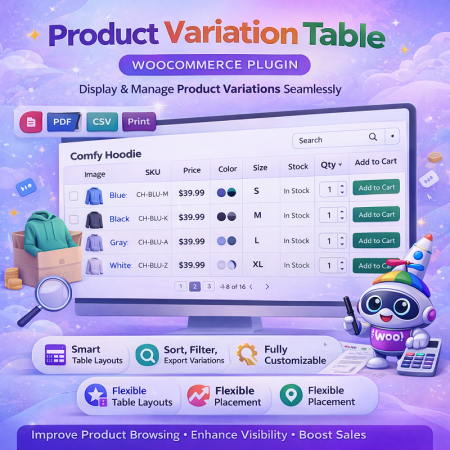
 Product Variation Table Woocommerce Plugin
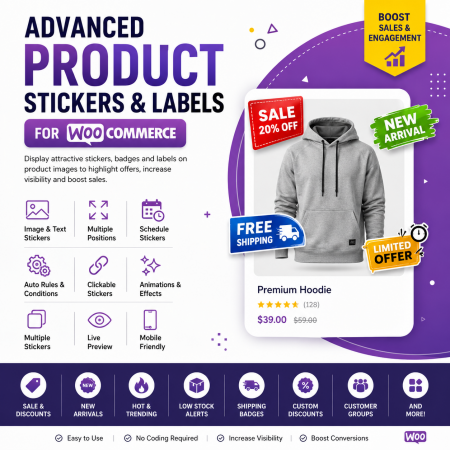
 Advanced Product Stickers & Labels Plugin for WooCommerce

 Buy Now Button – Quick Purchase & Direct Checkout Plugin for WooCommerce


