- -$100.00
- New


This module enhances the shopping experience by allowing customers to easily explore product variations such as...

The module allows merchants to enhance product images with customizable stickers and labels. Whether it’s...

The Quantity Discount Table & Grid Module for PrestaShop helps merchants display...

This module allows you to offer free shipping based on flexible conditions, such as location, carrier, cart value,...

The module automatically adjusts language, currency, and country settings based on the customer's location....
Vendor
Version
Last update
Prestashop version
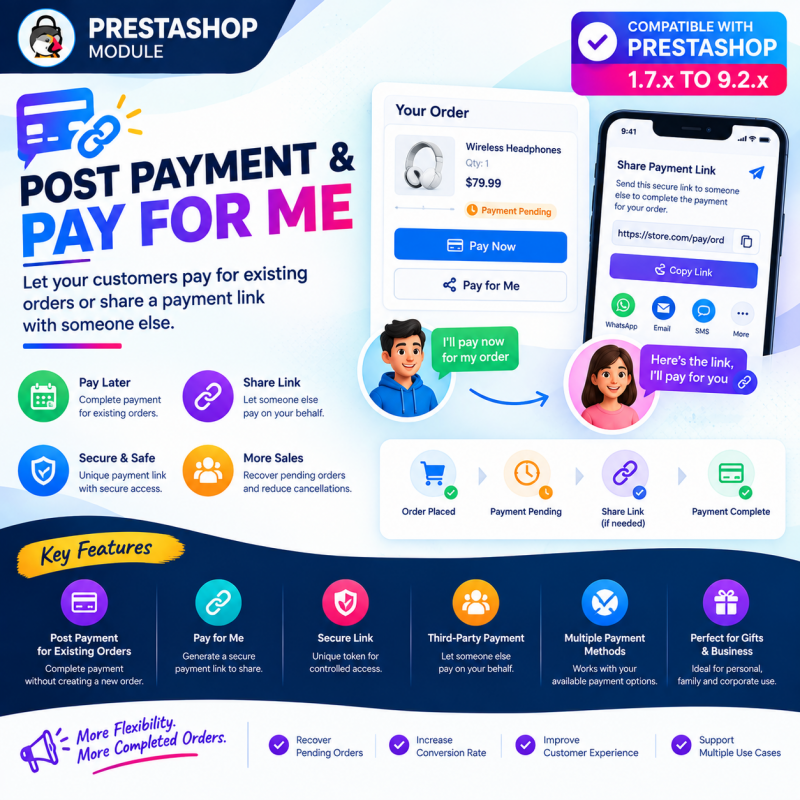
Allow customers to pay for existing unpaid or partially paid orders in PrestaShop, or let someone else pay on their behalf using a unique payment link. Display the outstanding balance automatically, simplify the payment process, and update the original order status once the payment is completed.
"Whether an order is completely unpaid or has only been partially paid, customers can conveniently settle the outstanding amount online or let someone else complete the payment through a unique payment link."
Give your customers more flexibility with the Post Payment & Pay for Me Module for PrestaShop. This module allows customers to complete online payments for existing unpaid orders, even after an order has already been placed. Customers can also share a unique payment link with friends, family members or other people who want to pay on their behalf.
PrestaShop does not provide this complete post-order payment and third-party payment workflow by default. This module fills that gap by allowing merchants to accept orders without collecting online payments immediately and subsequently collect payments through the online payment options configured for the module.
Whether you operate a store that accepts offline payments, offer booking and reservation orders, allow customers to pay later or simply want to make it easier for someone else to pay for an order, this module provides a convenient solution without requiring customers to repeat the checkout process.
Key Benefits:
Allow customers to pay for existing unpaid orders after order placement.
Let customers share unique payment links with friends, family members or colleagues.
Allow anyone with a valid payment link to pay without logging into the customer's account.
Avoid repeating customer information, address and shipping steps.
Display only the payment methods configured for the module.
Automatically update the original order after successful payment.
Automatically invalidate the payment link once the associated order is paid.
Traditional PrestaShop checkout is designed around collecting payment during the order placement process. However, not every merchant needs or wants to collect online payments immediately.
For example, a merchant may accept booking orders, allow customers to reserve products, confirm purchases through offline payment arrangements or create orders that will be paid at a later time.
In these situations, customers may subsequently prefer to pay online rather than use their original payment arrangement. Alternatively, the person placing the order may want someone else to complete the payment.
The Post Payment & Pay for Me module makes these workflows possible by connecting existing unpaid orders with a dedicated online payment page.
Instead of creating another order, repeating checkout or sharing customer account credentials, customers can simply use the payment options available for their existing order.
The module provides a simple six-step payment workflow, from placing an order to completing its payment.
The customer places an order without making an online payment immediately, using the merchant's existing offline payment, deferred payment or booking workflow.
The order is created in PrestaShop and remains pending payment.
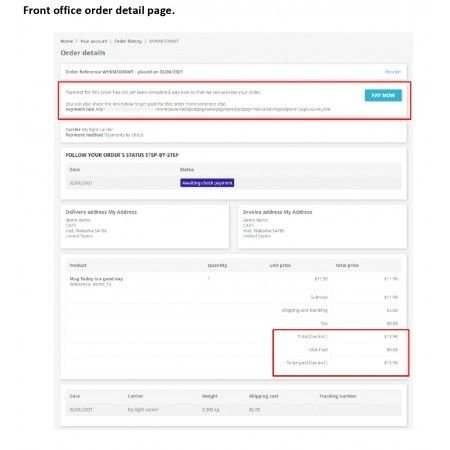
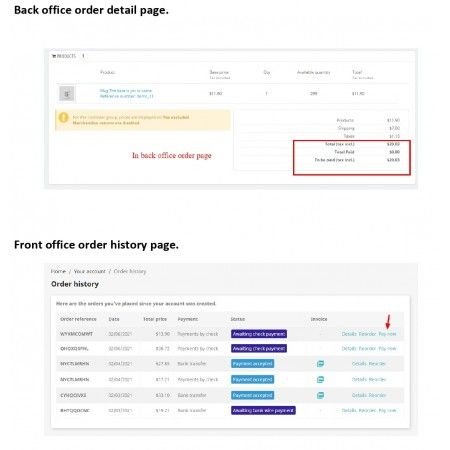
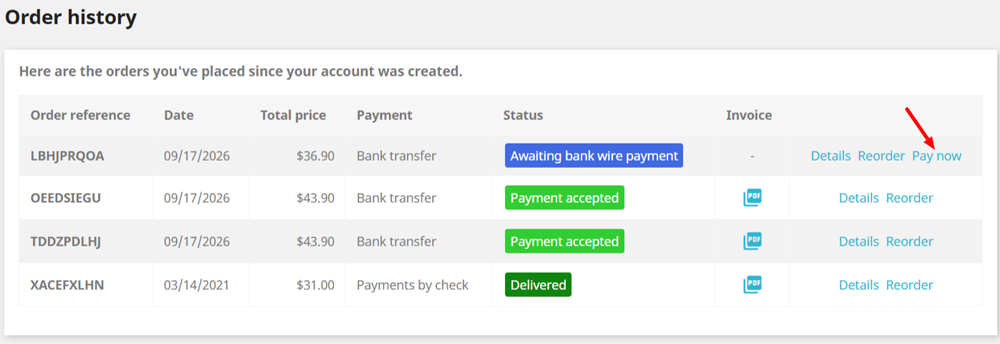
Once an eligible unpaid order is created, the module displays a Pay Now button and a unique payment link in the customer's account.
These payment options are available on:
Customer Order History page.
Individual Order Detail page.
Customers can click Pay Now to pay directly or copy and share the unique payment link with another person.
Customers have two ways to complete the payment:
Pay for My Order: Click the Pay Now button to open the dedicated payment page and pay for the order themselves.
Pay for Me: Share the unique payment link with a friend, family member, colleague or anyone responsible for making the payment.
The recipient can open the shared link and complete the payment without accessing the original customer's account or knowing their login credentials.
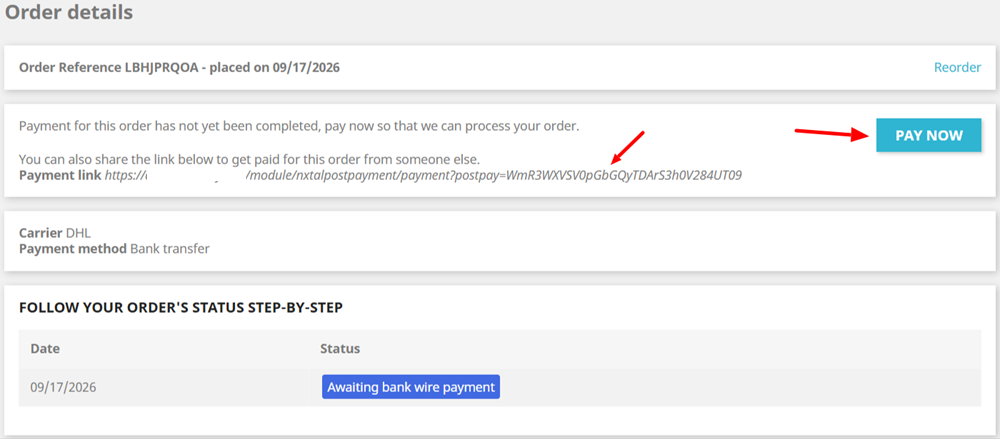
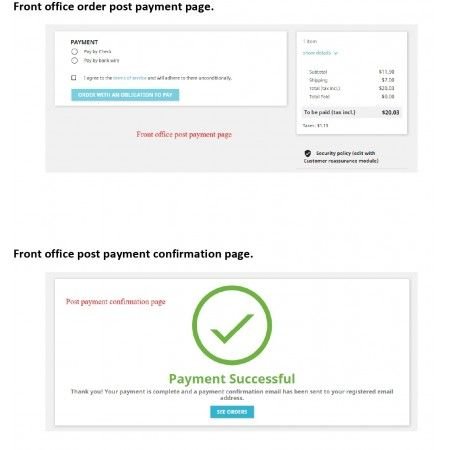
When someone clicks the Pay Now button or opens the shared payment link, the module opens a dedicated payment page for the associated order.
The existing order information and outstanding payable amount are automatically populated on the dedicated payment page. Whether the order is completely unpaid or has already received a partial payment, the module displays the remaining amount to be paid.
Since the order has already been created, the payer does not need to repeat the standard checkout steps, such as:
Customer account information.
Billing and delivery address information.
Shipping method selection.
Other order creation steps.
The payment page focuses exclusively on completing the pending payment.
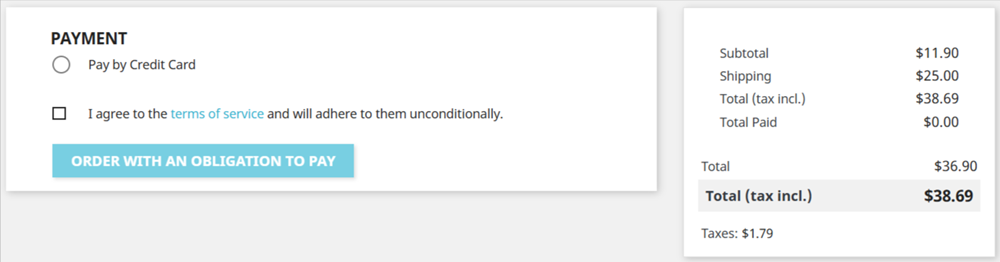
The payer can select one of the payment methods configured and enabled for the module and complete the transaction.
One of the most useful aspects of this functionality is that the payer does not need to log in to the original customer's PrestaShop account.
This means customers can share their payment links with friends, family members or colleagues and let them complete the payment independently.
Only the payment methods configured for the module are displayed on the dedicated payment page.
After successful payment:
The payment is associated with the original order.
The original order status is updated to the status configured by the merchant.
The payer is redirected to a payment confirmation page.
The payment link becomes invalid and cannot be reused.
This ensures that customers can complete payment for their existing orders without creating duplicate orders or repeating the checkout process.
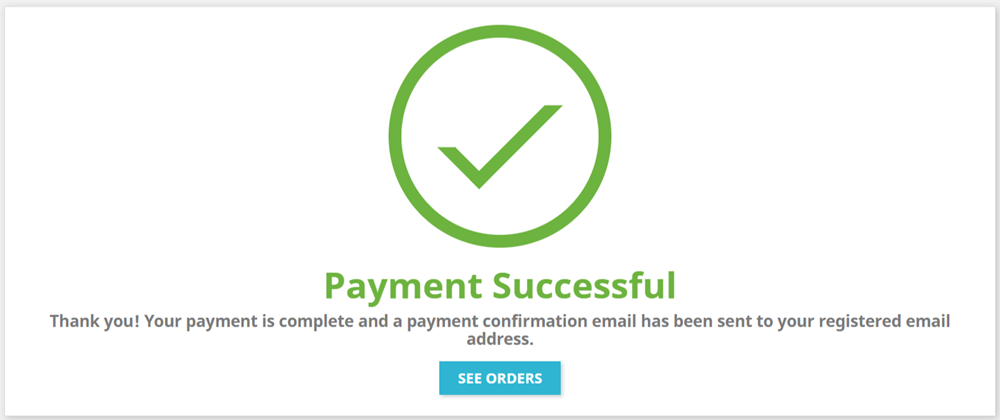
Allow customers to complete online payments for orders that were previously placed without online payment.
The module displays a Pay Now button for eligible unpaid orders, making it easier for customers to return to their existing purchases and complete payment whenever they are ready.
Allow customers to complete payments for orders that have already received a partial payment but still have an outstanding balance.
Sometimes customers pay only a portion of their order amount initially, while the remaining amount needs to be collected later. This can happen with booking orders, advance payments, reservations or other purchasing arrangements where merchants collect payments in multiple stages.
The Post Payment & Pay for Me module makes it possible to collect the outstanding amount against the existing order instead of requiring customers to create another order.
When an eligible partially paid order is accessed through the Pay Now button or its unique payment link, the module displays the remaining payable amount so that the customer or another person can complete the outstanding payment online.
Key benefits:
Collect outstanding balances for partially paid orders.
Allow customers to pay the remaining amount online.
Let another person pay the outstanding balance through a shared payment link.
Avoid creating duplicate orders to collect remaining payments.
Automatically update the original order after successful payment, according to the configured order status.
Allow customers to share their order payment links with anyone who wants to pay on their behalf.
Each eligible unpaid order has its own unique payment link. Customers can share this link without providing their account credentials or allowing someone else to access their customer account.
This is particularly useful when the person placing an order is different from the person responsible for making the payment.
The module generates a unique payment link for each eligible unpaid order.
When someone opens the link, the corresponding order information and payment amount are automatically populated on the dedicated payment page.
The payer does not need to search for an order, enter an order reference or manually provide the order amount.
Each payment link is intended for one successful payment only.
As soon as the associated order is successfully paid, its payment link automatically becomes invalid. If someone attempts to open or reuse the same link after the order has already been paid, the payment cannot be initiated again.
This prevents an already-paid order from being paid again through its previous payment link.
Key benefits:
A unique payment link for each eligible unpaid order.
Convenient sharing with other people.
No need to share customer account credentials.
No customer account login required for the payer.
Automatic invalidation after successful payment.
No reuse of the payment link for an already-paid order.
The person making the payment does not need to log in to the original customer's PrestaShop account.
Customers can simply share their unique payment links with friends, family members or other people who want to pay for their orders.
The recipient can independently access the dedicated payment page and complete the payment.
The module provides a dedicated payment page instead of sending customers through the entire standard checkout process again.
Since the order has already been created, the page automatically displays the related order information and payment amount.
Customers and third-party payers do not need to repeat account registration, address entry, billing information or shipping selection.
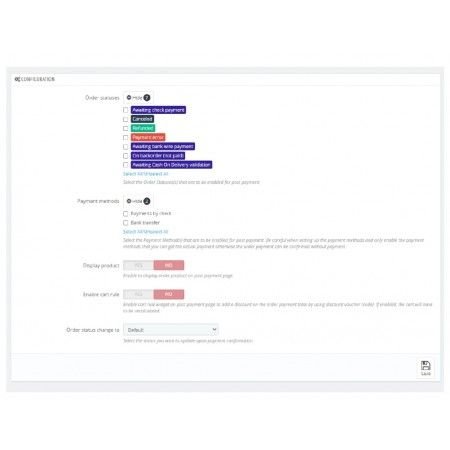
Merchants can configure which payment options should be available when customers or third parties pay for existing orders.
Only the payment methods enabled for the module are displayed on the dedicated payment page.
This gives merchants control over the online payment options available for post-order payments.
After successful payment, the module updates the original order to the order status configured by the merchant.
This allows merchants to identify successfully paid orders and continue processing them through their existing PrestaShop order management workflow.
After successfully completing payment, the payer is shown a confirmation page indicating that the payment has been completed.
This provides a clear completion step for both the original customer and anyone paying through a shared payment link.
The Post Payment & Pay for Me module is suitable for different types of PrestaShop businesses where the person placing an order may not be ready or responsible to pay immediately.
Businesses that accept bookings or reservations often need to create orders before collecting payment.
For example, a customer may reserve a product, service or appointment and choose to pay later.
With this module, customers can return to their existing orders and complete payment online whenever they are ready, without creating another order.
Some merchants initially accept orders through offline payment arrangements, such as bank transfers or other manual payment methods.
However, customers may later prefer to complete their payments online using the store's available payment options.
Instead of placing another order, customers can simply click the Pay Now button associated with their original order.
Imagine a customer purchasing a birthday gift, a product for a family member or an item for a friend.
The customer can place the order and share its unique payment link with the person who will make the payment.
The recipient can open the payment link and complete the payment without logging in to the original customer's account.
This is particularly useful when the person receiving the product and the person paying for it are different.
In many organizations, employees may be responsible for selecting and placing orders, while the finance department or another authorized person handles the payment.
With the Pay for Me functionality, employees can share the order payment link with the person responsible for payment.
The recipient can complete the payment independently without needing the employee's customer account credentials.
Some merchants allow customers to submit orders first and arrange payment afterward.
This can be useful for stores that accept manual order confirmation, delayed payment arrangements or other business-specific purchasing workflows.
The module provides an additional option to collect payment online after the order has already been created.
There are situations where the person who creates an order is not the person responsible for paying for it.
For example, a family member may place an order for another person, or an assistant may create an order that must be paid by a manager.
The unique payment link makes it possible for the responsible payer to complete payment without accessing the original customer's account.
PrestaShop's standard checkout process is designed to collect payment during order placement. Conventional payment retry functionality generally helps customers attempt a failed or incomplete payment again.
However, these approaches do not necessarily provide the complete post-order payment and third-party payment workflow offered by this module.
The Post Payment & Pay for Me module extends the purchasing experience by allowing customers to pay for existing unpaid orders after order creation or share a unique payment link with another person who can complete the payment without logging in to the original customer's account.
| Functionality | Standard Checkout | Conventional Payment Retry | Post Payment & Pay for Me |
|---|---|---|---|
| Place an order without immediate online payment | Depends on payment workflow | Depends on payment workflow | Yes |
| Pay for an existing unpaid order | Not the primary purpose | Generally for failed or incomplete payments | Yes |
| Dedicated post-order payment page | No, standard checkout | Depends on implementation | Yes |
| Shareable order-specific payment link | Not by default | Depends on implementation | Yes |
| Collect remaining balance of partially paid orders | Not by default | Depends on implementation | Yes |
| Allow another person to pay | Not by default | Not generally | Yes |
| Payer login to customer's account required | Depends on checkout | Depends on implementation | No |
| Repeat account and address steps | Usually part of checkout | Depends on implementation | No |
| One-time link invalidated after successful payment | Not applicable | Depends on implementation | Yes |
| Update the original order after successful payment | Yes | Usually | Yes |
What Makes This Module Different?
Accept orders without requiring immediate online payment.
Complete payment against the original order instead of creating another order.
Let friends, family members or colleagues pay through a unique payment link.
Allow third-party payments without customer account login.
Avoid repeating account, address and shipping information.
Automatically invalidate the payment link after successful payment.
Update the original order with the configured order status.
Whether you accept offline payments, manage reservations, offer deferred payment arrangements or allow customers to purchase products for other people, this module provides a more flexible way to collect online payments in PrestaShop.
The module integrates the post-order payment workflow into your existing PrestaShop store.
For merchants:
Download and install the module in your PrestaShop store.
Open the module configuration page.
Configure the payment methods that should be available for post-order payments.
Select the order status that should be assigned after successful payment.
Save the configuration.
Once configured, the module makes its payment options available for eligible unpaid orders.
For customers:
Place an order using the store's available order creation and payment workflow.
Open My Account and navigate to Order History.
Find the order for which payment is still pending.
Click Pay Now to pay directly, or copy and share the payment link with someone else.
Complete the payment using one of the available payment methods.
For someone paying on behalf of the customer:
Receive the unique payment link from the customer.
Open the link in a browser.
Review the associated order information and payment amount.
Select an available payment method.
Complete the payment and view the confirmation page.
It is a PrestaShop module that allows customers to pay for existing unpaid orders after they have been placed. It also allows customers to share unique payment links so that friends, family members or other people can pay on their behalf.
Yes. The module displays a Pay Now button for eligible unpaid orders in the customer's Order History and Order Detail pages. Customers can use it to open the dedicated payment page and complete payment for their existing order.
Yes. Customers can share their order's unique payment link with another person. The recipient can open the link and complete the payment without accessing the original customer's account.
No. The payer does not need to log in to the original customer's account to access the payment page and complete payment through the shared link.
No. The payment is associated with the existing order. The module is designed to complete payment for the original order rather than requiring the customer to place another order.
No. The original order has already been created with its associated information. The dedicated payment page displays the existing order information and amount without requiring the payer to repeat the account, address and shipping steps.
Only the payment methods configured and enabled for the module are displayed. Merchants can control which payment options customers and third-party payers can use for completing existing orders.
Yes. It is suitable for booking and reservation workflows where merchants create orders without collecting online payment immediately and allow customers to pay afterward.
After successful payment, the original order status is updated to the status configured in the module. The payer is also shown a payment confirmation page.
No. Each payment link is intended for one successful payment. As soon as its associated order is successfully paid, the link becomes invalid and cannot be used to initiate another payment.
The payment link will no longer work. Once the associated order has been successfully paid, the link is invalidated and cannot be reused.
Yes. Customers can place orders for gifts and share their unique payment links with the people who will pay for those purchases. The recipient can complete the payment without accessing the original customer's account.
Yes. The module also supports collecting outstanding balances for partially paid orders. If a customer has already paid a portion of the order amount, the remaining payable amount can be displayed on the dedicated payment page. Customers or third parties can then complete the outstanding payment using the available payment methods without creating another order.
Yes. Customers can share the unique payment link with another person, allowing them to complete the outstanding payment without logging in to the original customer's account.
PrestaShop's standard checkout process does not provide this complete combination of post-order payment and third-party payment through unique order-specific links.
This module extends the purchasing experience by allowing customers to place orders first and complete their payments later, either themselves or through someone else.
Instead of repeating checkout, creating another order or sharing customer account credentials, customers can simply use the payment option associated with their existing order.
Make post-order payments easier, offer greater purchasing flexibility and simplify the way your store collects payments with the Post Payment & Pay for Me Module for PrestaShop.
| Vendor | Nxtal |
|---|---|
| Last update | Nov 05, 2026 |
| Version | 2.0.0 |
| Required store version | From 1.7.x to 9.2.x |
| Publication date | Sep 16, 2026 |
| Return Policy | You can return the product within the 30 Days return period for a full refund. No questions asked. |
| Customer Support | Enjoy one year of free customer support, including installation, troubleshooting, and usage guidance. |
| Description | This product is compatible with the specified versions and includes all the latest updates to enhance functionality and user experience. |
 Fast Order with Instant and File Search for PrestaShop Module
Allow customers to pay for existing unpaid or partially paid orders in PrestaShop, or let someone else pay on their behalf using a unique payment link. Display the outstanding balance automatically, simplify the payment process, and update the original order status once the payment is completed.

Encrypted payment gateways ensuring your financial and personal data remain 100% protected.

Every module includes professional installation assistance, free updates, and reliable troubleshooting.

Rigorously tested PrestaShop & WooCommerce extensions designed for maximum speed and zero bloat.

Transparent policies, clean documentation, and dedicated assistance if you run into any compatibility hurdles.